<?xml version="1.0" encoding="UTF-8"?>
<feed xmlns="http://www.w3.org/2005/Atom">
    <title>Model Seed</title>
    <link rel="alternate" type="text/html" href="http://blog.theseed.org/model_seed/" />
    <link rel="self" type="application/atom+xml" href="http://blog.theseed.org/model_seed/atom.xml" />
    <id>tag:blog.theseed.org,2010-08-12:/model_seed//22</id>
    <updated>2011-07-29T17:48:10Z</updated>
    
    <generator uri="http://www.sixapart.com/movabletype/">Movable Type Pro 5.02</generator>

<entry>
    <title>Excel downloads of models, biochemistry database</title>
    <link rel="alternate" type="text/html" href="http://blog.theseed.org/model_seed/2011/05/excel-download-fixed-bugs.html" />
    <id>tag:blog.theseed.org,2011:/model_seed//22.982</id>

    <published>2011-05-04T19:23:23Z</published>
    <updated>2011-07-29T17:48:10Z</updated>

    <summary>You can now download model files as Excel documents. Simply select the model in the Model Viewer and click the &quot;Excel format&quot; download option. We also have Excel files of the current reaction and compound databases; these can be downloaded...</summary>
    <author>
        <name>Scott</name>
        
    </author>
    
    <category term="downloads" label="downloads" scheme="http://www.sixapart.com/ns/types#tag" />
    <category term="modelview" label="model view" scheme="http://www.sixapart.com/ns/types#tag" />
    <category term="updates" label="updates" scheme="http://www.sixapart.com/ns/types#tag" />
    
    <content type="html" xml:lang="en-us" xml:base="http://blog.theseed.org/model_seed/">
        <![CDATA[<p>You can now download model files as Excel documents. Simply select the model in the <a href="http://seed-viewer.theseed.org/models/">Model Viewer</a> and click the "Excel format" download option. We also have Excel files of the current reaction and compound databases; these can be downloaded from the same page under the "Select models and run FBA" tab when you have no model selected. You can also download it directly: <a href="pubseed.theseed.org/ModelSEEDdownload.cgi?biochemistry=1">ModelSEED-biochemistry-db.xls</a></p>
]]>
        

    </content>
</entry>

<entry>
    <title>Using ModelView - Part 6: Editing Your Model</title>
    <link rel="alternate" type="text/html" href="http://blog.theseed.org/model_seed/2010/09/using-modelview---part-6-editing-your-model.html" />
    <id>tag:blog.theseed.org,2010:/model_seed//22.822</id>

    <published>2010-09-30T16:47:31Z</published>
    <updated>2010-10-01T16:49:43Z</updated>

    <summary>We are currently developing tools for curating models generated with the RAST pipeline. We will update the blog when these tools are available....</summary>
    <author>
        <name>Scott</name>
        
    </author>
    
    
    <content type="html" xml:lang="en-us" xml:base="http://blog.theseed.org/model_seed/">
        <![CDATA[<p>We are currently developing tools for curating models generated with the RAST pipeline. We will update the blog when these tools are available.</p>
]]>
        

    </content>
</entry>

<entry>
    <title>Part 4: Downloading Model Content</title>
    <link rel="alternate" type="text/html" href="http://blog.theseed.org/model_seed/2010/08/part-4-downloading-model-content.html" />
    <id>tag:blog.theseed.org,2010:/model_seed//22.412</id>

    <published>2010-08-18T22:08:34Z</published>
    <updated>2010-08-18T22:21:31Z</updated>

    <summary>This is part of the tutorial series Using ModelView First be sure to select the model you are interested in. In the Model Overview section, at the far right are several links for downloading model content. SBML, or Systems Biology...</summary>
    <author>
        <name>Scott</name>
        
    </author>
    
    
    <content type="html" xml:lang="en-us" xml:base="http://blog.theseed.org/model_seed/">
        <![CDATA[<p><em>This is part of the tutorial series <a href="http://blog.theseed.org/model_seed/2010/08/using-modelview---introduction.html">Using ModelView</a></em></p>

<p>First be sure to select the model you are interested in. In the Model Overview section, at the far right are several links for downloading model content.</p>

<p><img src="http://blog.theseed.org/model_seed/MVDownload/MVDownload01.png" alt="Download Links" title="" /></p>

<p>SBML, or <a href="http://sbml.org/">Systems Biology Markup Language</a>, is a standardized XML document for representing models. Model SEED Format is a semicolon delimitated table of model data that you can import into a spreadsheet program. LP Format is the Linear Programming optimization file that is used for performing flux balance analysis.</p>

<p>Continue on to <a href="http://blog.theseed.org/model_seed/2010/08/using-modelview---part-5-running-flux-balance-analysis-on-models.html">Part 5: Running Flux-Balance Analysis on Models</a></p>
]]>
        

    </content>
</entry>

<entry>
    <title>Using ModelView - Part 5: Running Flux-Balance Analysis on Models</title>
    <link rel="alternate" type="text/html" href="http://blog.theseed.org/model_seed/2010/08/using-modelview---part-5-running-flux-balance-analysis-on-models.html" />
    <id>tag:blog.theseed.org,2010:/model_seed//22.392</id>

    <published>2010-08-18T20:41:39Z</published>
    <updated>2010-08-18T22:40:27Z</updated>

    <summary>This is part of the tutorial series Using ModelView Select one or more models Select one or more models. Then, from the &quot;Selected Models/FBA&quot; tab, click the &quot;Run FBA&quot; bar to open the flux panel. Select media condition Now, select...</summary>
    <author>
        <name>Scott</name>
        
    </author>
    
    
    <content type="html" xml:lang="en-us" xml:base="http://blog.theseed.org/model_seed/">
        <![CDATA[<p><em>This is part of the tutorial series <a href="http://blog.theseed.org/model_seed/2010/08/using-modelview---introduction.html">Using ModelView</a></em></p>

<h1>Select one or more models</h1>

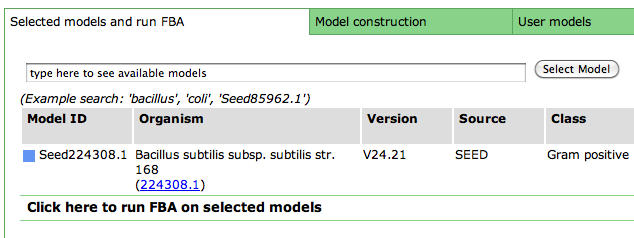
<p>Select one or more models. Then, from the "Selected Models/FBA" tab, click the "Run FBA" bar to open the flux panel.</p>

<p><img src="http://blog.theseed.org/model_seed/MVFlux/MVFlux01.png" alt="Flux Bar Closed" title="" /></p>

<h1>Select media condition</h1>

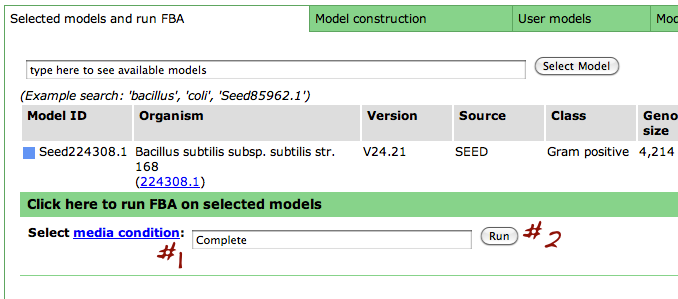
<p>Now, select a media condition on which to run the flux balance analysis: begin typing in the media condition name (#1) until yours is selected or select it from the drop down list. Then click "Run" (#2).</p>

<p><img src="http://blog.theseed.org/model_seed/MVFlux/MVFlux02.png" alt="Flux Bar Open" title="" /></p>

<h1>Saved fluxes table</h1>

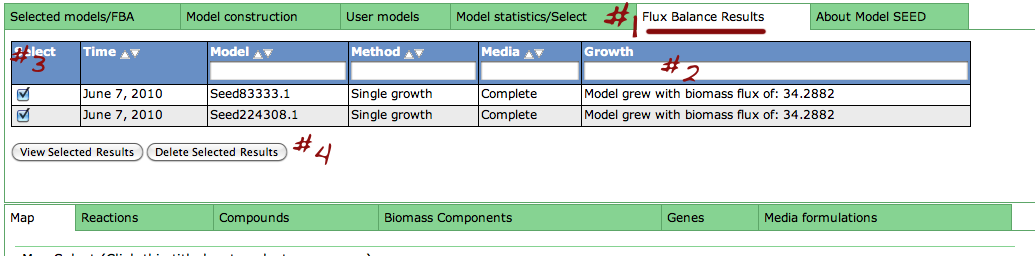
<p>Clicking the "Run" button above will take you to the "Flux Balance Results" tab (#1). From here, you can see basic information about your saved fluxes: the date it was ran on, model ID, method media name and final biomass flux (#2). From here, you can check the select-box next to specific runs you would like to see in more detail (#3) and click "View selected results". You can also delete results by checking the box and clicking "Delete selected results".</p>

<p><img src="http://blog.theseed.org/model_seed/MVFlux/MVFlux03.png" alt="Saved Fluxes" title="" /></p>

<h1>View Flux Details</h1>

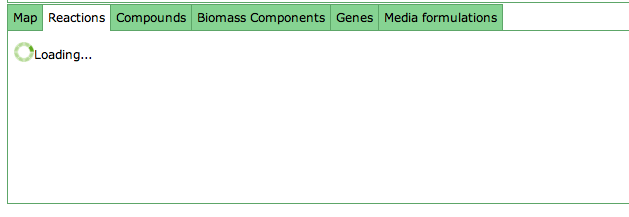
<p>Clicking the "View selected results" button will switch to the "Reaction tab", which may take some time to load.</p>

<p><img src="http://blog.theseed.org/model_seed/MVFlux/MVFlux04.png" alt="Loading Fluxes" title="" /></p>

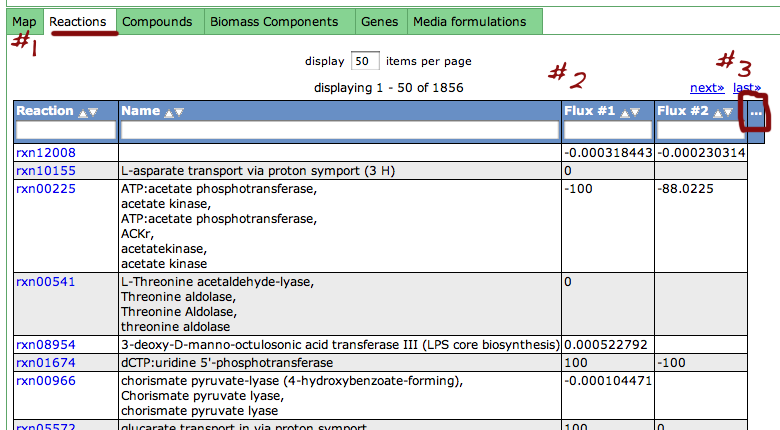
<p>Once the "Reaction" tab (#1) has loaded, you will see the flux results in tabs titled "Flux #1", "Flux #2", etc. for the fluxes you selected (#2). You can add or remove columns from the table by clicking the "..." header.</p>

<p><img src="http://blog.theseed.org/model_seed/MVFlux/MVFlux05.png" alt="Flux Information" title="" /></p>
]]>
        

    </content>
</entry>

<entry>
    <title>Using ModelView - Part 2: Viewing Model Details</title>
    <link rel="alternate" type="text/html" href="http://blog.theseed.org/model_seed/2010/08/using-modelview---part-2-viewing-model-details.html" />
    <id>tag:blog.theseed.org,2010:/model_seed//22.382</id>

    <published>2010-08-18T20:31:56Z</published>
    <updated>2010-08-18T22:46:30Z</updated>

    <summary>This is part of the tutorial series Using ModelView. General Info After you have selected a model, you can use the tools within the Model SEED to examine the information for that model. The tools organize the data associated with...</summary>
    <author>
        <name>Scott</name>
        
    </author>
    
    
    <content type="html" xml:lang="en-us" xml:base="http://blog.theseed.org/model_seed/">
        <![CDATA[<p><em>This is part of the tutorial series <a href="http://blog.theseed.org/model_seed/2010/08/using-modelview---introduction.html">Using ModelView</a>.</em></p>

<h1>General Info</h1>

<p>After you have selected a model, you can use the tools within the Model SEED to examine the information for that model. The tools organize the data associated with the model into maps and tables that make it easy for the user to search or browse for relevant information.</p>

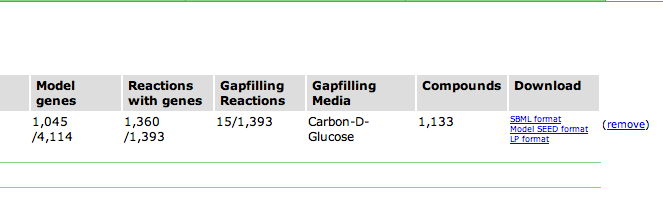
<p>Upon selecting the model, you are greeted with an overview page. This contains information about the organism and the model. You can download the complete model in differnet formats (SBML, Model SEED, and LP), and deselect this model from this page as well.</p>

<p><img src="http://blog.theseed.org/model_seed/MVViewing/MVViewing01.png" alt="General Model Info" title="" /></p>

<p>Underneath the first set of tabs is another tabbed interface which contains the model information.</p>

<h1>KEGG Maps</h1>

<p><img src="http://blog.theseed.org/model_seed/MVViewing/MVViewing02.png" alt="Maps Tab" title="" /></p>

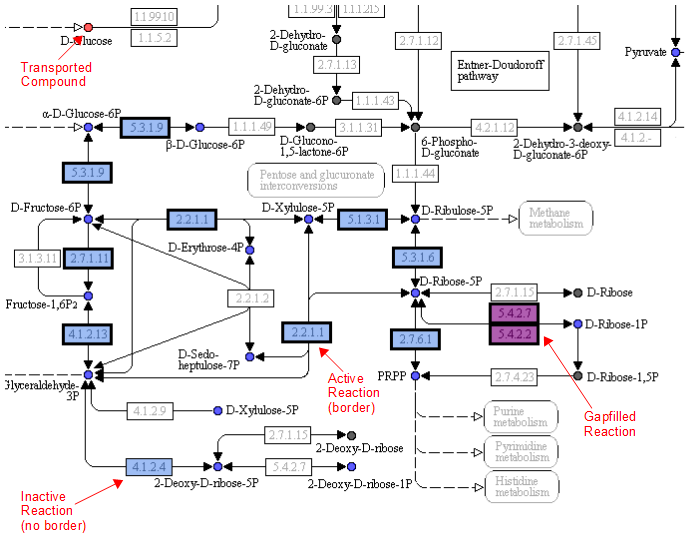
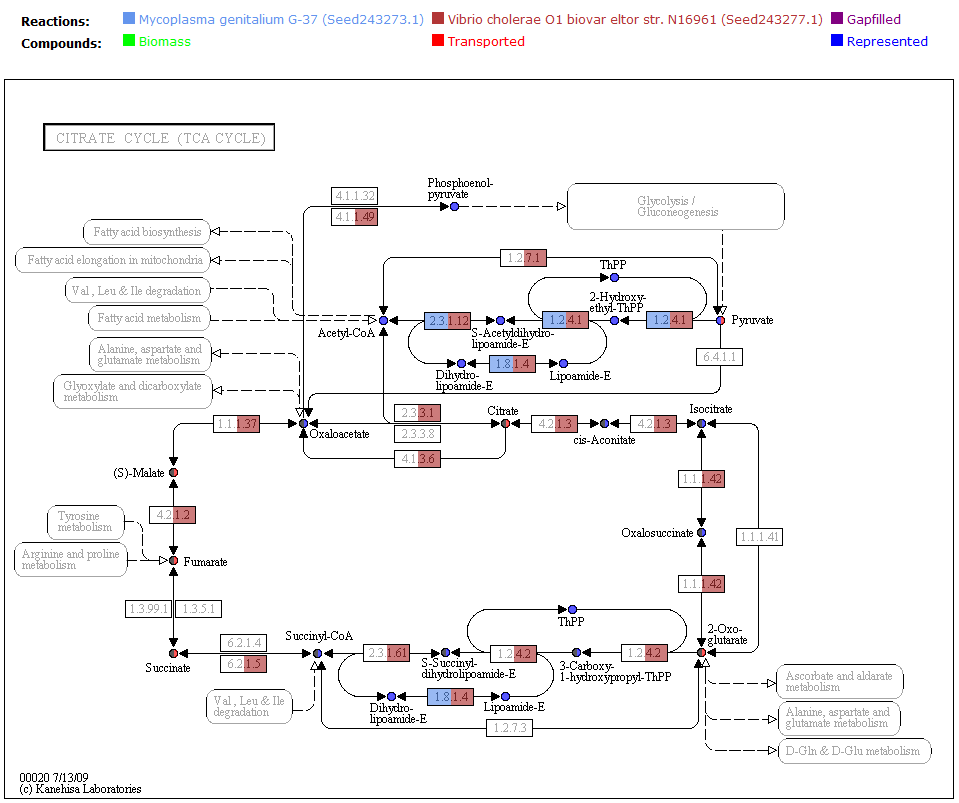
<p>One way the data is organized is by KEGG pathways. The model information is overlaid onto the KEGG maps with a color scheme to determine the state of the compounds and reactions.</p>

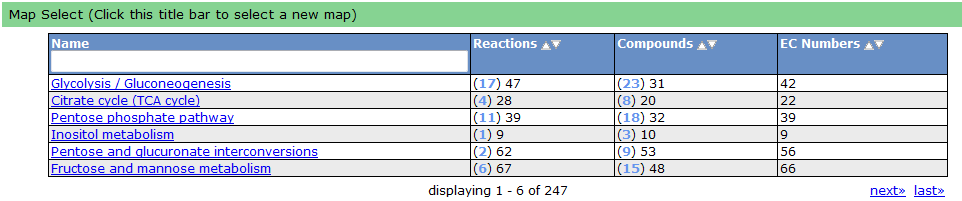
<p>To see a list of all the available maps, click the "Map Select" bar.</p>

<p><img src="http://blog.theseed.org/model_seed/MVViewing/MVViewing03.png" alt="Map Select" title="" /></p>

<p>Clicking on one of the links causes the new map to show up in place of the current map.</p>

<p>A legend tells the user how to interpret the colors. The compounds (circles) can have the following attributes: Transported, Represented, or Biomass. If the compound is gray, then it is not in the model. The reactions (rectangle) are colored according to the organism that is currently selected. If a reaction appears purple, then it is gapfilled.</p>

<p><img src="http://blog.theseed.org/model_seed/MVViewing/MVViewing04.png" alt="Annotated KEGG Map" title="" /></p>

<h1>Reaction Tab</h1>

<p><img src="http://blog.theseed.org/model_seed/MVViewing/MVViewing05.png" alt="Reaction Tab" title="" /></p>

<p>To view all the reactions in the model, click on the 'Reactions' tab. This brings up a table containing each reaction and some general information. The table contains the following columns:</p>

<p><img src="http://blog.theseed.org/model_seed/MVViewing/MVViewing06.png" alt="Reaction Table Header" title="" /></p>

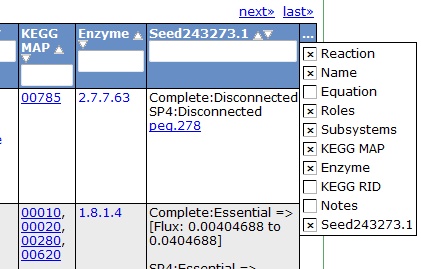
<p>This table can be searched and sorted via the column headers. Also, you can hide columns by clicking on the '...' in the last column and unselecting column names.</p>

<p><img src="http://blog.theseed.org/model_seed/MVViewing/MVViewing07.png" alt="Reaction Table Header Select" title="" /></p>

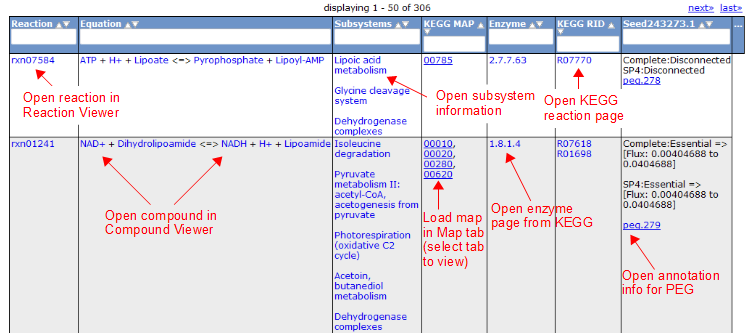
<p>Here is an overview of the links inside the reaction table.</p>

<p><img src="http://blog.theseed.org/model_seed/MVViewing/MVViewing08.png" alt="Reaction Table Details" title="" /></p>

<h1>Compound Tab</h1>

<p><img src="http://blog.theseed.org/model_seed/MVViewing/MVViewing09.png" alt="Compound Tab" title="" /></p>

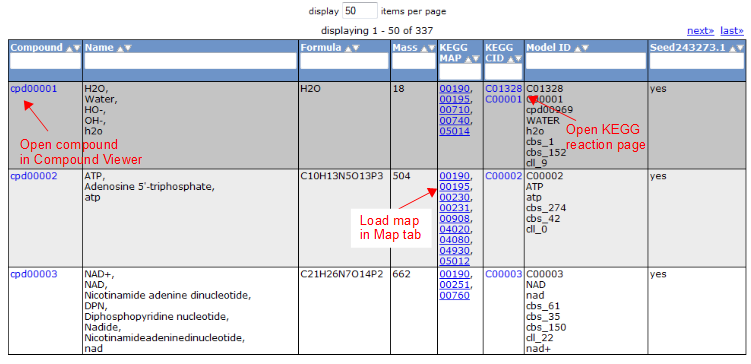
<p>To view all the compounds in the model, click on the 'Compounds' tab. This tab contains a table with additional information about each compound.</p>

<p><img src="http://blog.theseed.org/model_seed/MVViewing/MVViewing10.png" alt="Compound Table" title="" /></p>

<h1>Gene Tab</h1>

<p><img src="http://blog.theseed.org/model_seed/MVViewing/MVViewing11.png" alt="Gene Tab" title="" /></p>

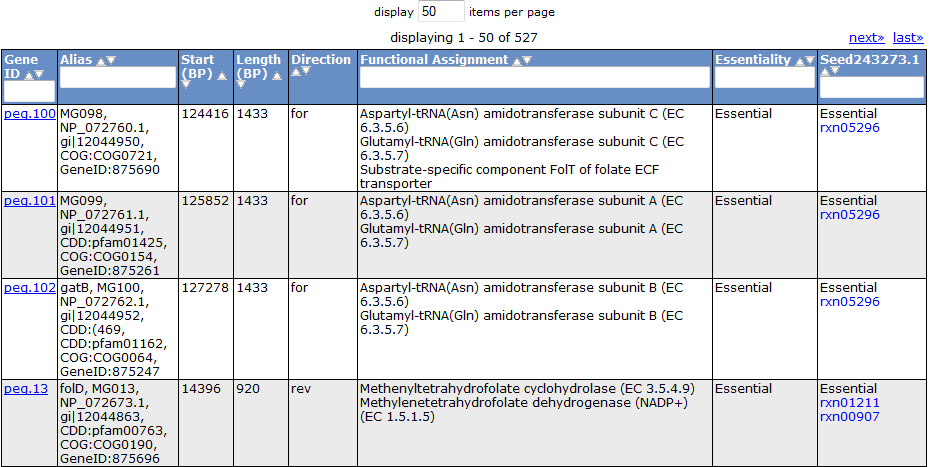
<p>Selecting the 'Gene' tab brings up a table containing all the genes in the model. This table shows information about the gene, such as the peg annotation, the functional assignment, and the essentiality.</p>

<p><img src="http://blog.theseed.org/model_seed/MVViewing/MVViewing12.png" alt="Gene Table" title="" /></p>

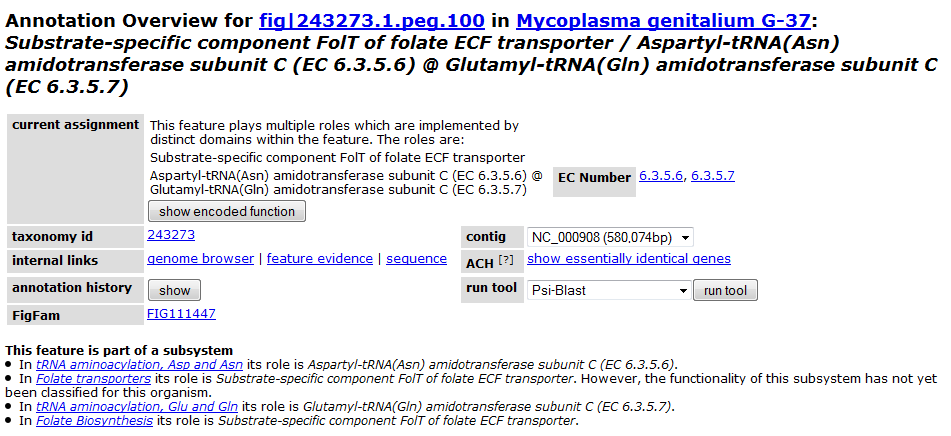
<p>Clicking on one of the peg links opens a new page devoted to that peg annotation in the currently selected organism. For example, the below image was for 'peg.100' in the table above. This is just a sample of some of the information shown on this page.</p>

<p><img src="http://blog.theseed.org/model_seed/MVViewing/MVViewing13.png" alt="Annotation Example" title="" /></p>

<p>Continue on to <a href="http://blog.theseed.org/model_seed/2010/08/using-modelview---part-3-comparing-two-or-more-models.html">Part 3: Comparing Two or More Models</a></p>
]]>
        

    </content>
</entry>

<entry>
    <title>Using ModelView - Part 3: Comparing Two or More Models</title>
    <link rel="alternate" type="text/html" href="http://blog.theseed.org/model_seed/2010/08/using-modelview---part-3-comparing-two-or-more-models.html" />
    <id>tag:blog.theseed.org,2010:/model_seed//22.372</id>

    <published>2010-08-18T20:28:53Z</published>
    <updated>2010-08-18T22:10:04Z</updated>

    <summary>This is part of the tutorial series Using ModelView In order to compare models, you must first select two or more models to begin comparison. If you are already viewing a model and select a new model, the two models...</summary>
    <author>
        <name>Scott</name>
        
    </author>
    
    
    <content type="html" xml:lang="en-us" xml:base="http://blog.theseed.org/model_seed/">
        <![CDATA[<p><em>This is part of the tutorial series <a href="http://blog.theseed.org/model_seed/2010/08/using-modelview---introduction.html">Using ModelView</a></em></p>

<p>In order to compare models, you must first select two or more models to begin comparison. If you are already viewing a model and select a new model, the two models will show up side-by-side. To do this, simply click on any model link that can be found throughout the Model SEED page, either in the 'Selected Models/FBA' tab, the 'Model Statistics/Select' tab, or the 'User models' tab.</p>

<p>Once you have selected multiple models, you will be greeted with a broad overview of the models.</p>

<p><img src="http://blog.theseed.org/model_seed/MVCompare/MVCompare01.png" alt="Selected Models" title="" /></p>

<p>Viewing the Maps</p>

<p>The KEGG maps are used to help compare models by overlaying different colors according to the status of the reactions and compounds in each model. This allows you to quickly see which reactions and compounds belong to both models, and which do not. The legend tells you the color scheme so you can see which model is what color.</p>

<p><img src="http://blog.theseed.org/model_seed/MVCompare/MVCompare02.png" alt="KEGG Maps" title="" /></p>

<p>Comparing Reactions</p>

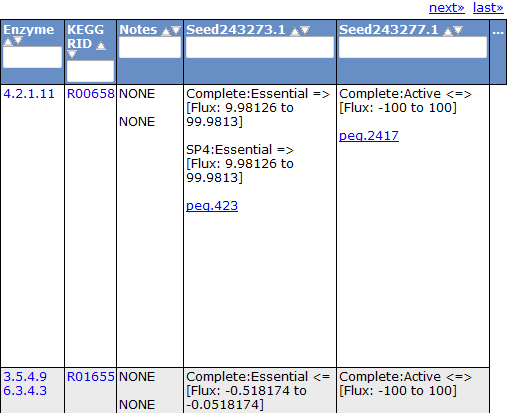
<p>To futher view the differences between models, you can compare the reactions by clicking on the 'Reactions' tab. The right columns of the table show the status of each reaction for the currently selected models.</p>

<p><img src="http://blog.theseed.org/model_seed/MVCompare/MVCompare03.png" alt="Reaction Table" title="" /></p>

<p>A similar comparison feature can be found in the compound tab, biomass tab, and gene tab.</p>

<p>Continue on to <a href="http://blog.theseed.org/model_seed/2010/08/part-4-downloading-model-content.html">Part 4: Downloading Model Content</a></p>
]]>
        

    </content>
</entry>

<entry>
    <title>Using ModelView - Introduction</title>
    <link rel="alternate" type="text/html" href="http://blog.theseed.org/model_seed/2010/08/using-modelview---introduction.html" />
    <id>tag:blog.theseed.org,2010:/model_seed//22.352</id>

    <published>2010-08-17T20:03:10Z</published>
    <updated>2010-08-18T22:42:44Z</updated>

    <summary>ModelView is the primary tool for viewing, comparing and testing models. In this tutorial series, we will show you how to use ModelView to explore your models. If you would like to know more about our methodology and terminology see...</summary>
    <author>
        <name>Scott</name>
        
    </author>
    
    
    <content type="html" xml:lang="en-us" xml:base="http://blog.theseed.org/model_seed/">
        <![CDATA[<p><a href="http://seed-viewer.theseed.org/models/">ModelView</a> is the primary tool for viewing, comparing and testing models. In this tutorial series, we will show you how to use ModelView to explore your models. If you would like to know more about our methodology and terminology see the <a href="http://blog.theseed.org/model_seed/tutorial-topics.html">methodology section</a> of our tutorials.</p>

<hr />

<h1>Tutorial Contents</h1>

<ul>
<li>Introduction</li>
<li>Part 1: <a href="http://blog.theseed.org/model_seed/2010/08/using-modelview---part-1-selecting-a-model.html">Selecting a Model</a></li>
<li>Part 2: <a href="http://blog.theseed.org/model_seed/2010/08/using-modelview---part-2-viewing-model-details.html">Viewing Model Details</a></li>
<li>Part 3: <a href="http://blog.theseed.org/model_seed/2010/08/using-modelview---part-3-comparing-two-or-more-models.html">Comparing Two or More Models</a></li>
<li>Part 4: <a href="http://blog.theseed.org/model_seed/2010/08/part-4-downloading-model-content.html">Downloading Model Content</a></li>
<li>Part 5: <a href="http://blog.theseed.org/model_seed/2010/08/using-modelview---part-5-running-flux-balance-analysis-on-models.html">Running Flux-Balance Analysis on Models</a></li>
</ul>

<hr />

<h1>Introduction</h1>

<p><em>Note: we recommend that you use the <a href="http://firefox.com/">Firefox</a> browser.</em></p>

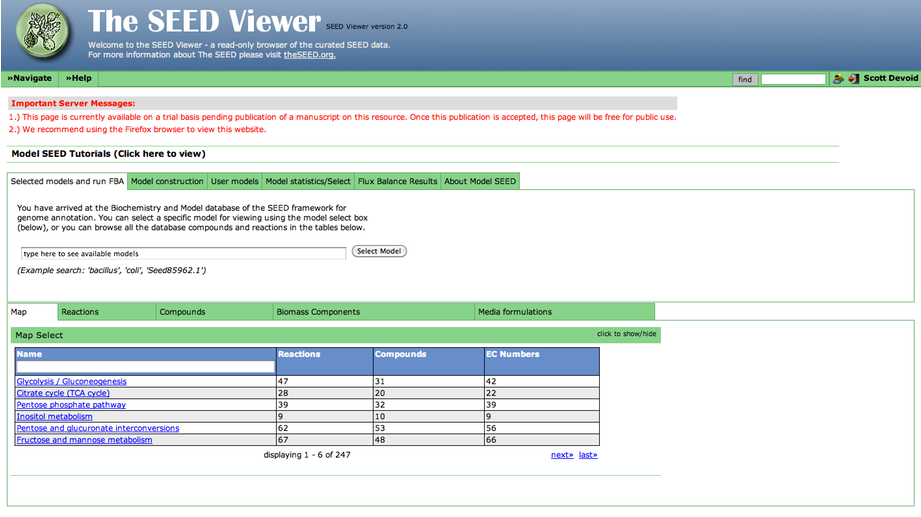
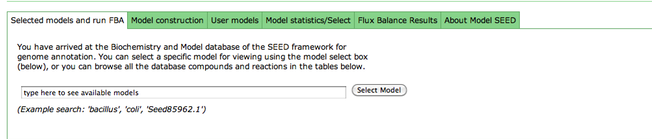
<p>Ok, if you visit the <a href="http://seed-viewer.theseed.org/models/">model viewer page</a> now, you'll get a page like this:</p>

<p><img src="http://blog.theseed.org/model_seed/MVIntro/overview.png" alt="Overview of ModelView" title="" /></p>

<p>Beneath the important server messages is a series of overview tabs labeled "Select models and run FBA", "Model Construction", "User Models", etc. Clicking on a tab will reveal it's content. </p>

<p><img src="http://blog.theseed.org/model_seed/MVIntro/first-tab.png" alt="Closeup of First Tab" title="" /></p>

<p>In addition, beneath this section is another set of tabs providing various views into the <em>model data</em>. This includes "Map" which contains KEGG maps annotated with model data, and "Reactions" and "Compounds" which contain details about the reactions and compounds present in the model. </p>

<p><img src="http://blog.theseed.org/model_seed/MVIntro/second-tab.png" alt="Closeup of Second Tab" title="" /></p>

<p>Continue to <a href="http://blog.theseed.org/model_seed/2010/08/using-modelview---part-1-selecting-a-model.html">Part 1: Selecting a Model</a>.</p>
]]>
        

    </content>
</entry>

<entry>
    <title>Using ModelView - Part 1: Selecting a Model</title>
    <link rel="alternate" type="text/html" href="http://blog.theseed.org/model_seed/2010/08/using-modelview---part-1-selecting-a-model.html" />
    <id>tag:blog.theseed.org,2010:/model_seed//22.342</id>

    <published>2010-08-17T19:17:58Z</published>
    <updated>2010-08-18T21:27:11Z</updated>

    <summary>This is part of the tutorial series Using ModelView. ModelView is the main tool for viewing, comparing, editing and testing your models. There are a number of different ways to select a model for viewing: Private RAST annotated genome: If...</summary>
    <author>
        <name>Scott</name>
        
    </author>
    
    
    <content type="html" xml:lang="en-us" xml:base="http://blog.theseed.org/model_seed/">
        <![CDATA[<p><em>This is part of the tutorial series <a href="http://blog.theseed.org/model_seed/2010/08/using-modelview---introduction.html">Using ModelView</a>.</em></p>

<p><a href="http://seed-viewer.theseed.org/models/">ModelView</a> is the main tool for viewing, comparing, editing and testing your models. There are a number of different ways to select a model for viewing:</p>

<ol>
<li><strong>Private RAST annotated genome:</strong> If you uploaded your genome to the <a href="http://rast.nmpdr.org/">RAST Annotation Server</a>, select the genome from the list of completed jobs and select "view model". This wil open the ModelView page with your model selected. Alternatively, you can open <a href="http://seed-viewer.theseed.org/models/">ModelView</a> and click the "User Models" tab. From here select your private model from the table.</li>
<li><strong>Publicly available models:</strong> We provide hundreds of publicly available models---both Model SEED generated models and models from the literature. If you know what model or organism you are looking for, type it into the box under the "Selected models and FBA". Otherwise, you can see all publicly available models under the "Model statistics/select" tab.</li>
</ol>

<p>Continue on to <a href="http://blog.theseed.org/model_seed/2010/08/using-modelview---part-2-viewing-model-details.html">Part 2: Viewing Model Details</a>.</p>
]]>
        

    </content>
</entry>

<entry>
    <title>What is a biomass reaction?</title>
    <link rel="alternate" type="text/html" href="http://blog.theseed.org/model_seed/2010/08/what-is-a-biomass-reaction.html" />
    <id>tag:blog.theseed.org,2010:/model_seed//22.292</id>

    <published>2010-08-16T19:32:13Z</published>
    <updated>2010-08-16T19:34:24Z</updated>

    <summary> Normal 0 false false false EN-US X-NONE X-NONE /* Style Definitions */ table.MsoNormalTable {mso-style-name:&quot;Table Normal&quot;; mso-tstyle-rowband-size:0; mso-tstyle-colband-size:0; mso-style-noshow:yes; mso-style-priority:99; mso-style-qformat:yes; mso-style-parent:&quot;&quot;; mso-padding-alt:0in 5.4pt 0in 5.4pt; mso-para-margin:0in; mso-para-margin-bottom:.0001pt; mso-pagination:widow-orphan; font-size:11.0pt; font-family:&quot;Calibri&quot;,&quot;sans-serif&quot;; mso-ascii-font-family:Calibri; mso-ascii-theme-font:minor-latin; mso-fareast-font-family:&quot;Times New Roman&quot;; mso-fareast-theme-font:minor-fareast; mso-hansi-font-family:Calibri; mso-hansi-theme-font:minor-latin; mso-bidi-font-family:&quot;Times...</summary>
    <author>
        <name>Chris Henry</name>
        
    </author>
    
    
    <content type="html" xml:lang="en-us" xml:base="http://blog.theseed.org/model_seed/">
        <![CDATA[<meta http-equiv="Content-Type" content="text/html; charset=utf-8"><meta name="ProgId" content="Word.Document"><meta name="Generator" content="Microsoft Word 12"><meta name="Originator" content="Microsoft Word 12"><link rel="File-List" href="file:///C:%5CDOCUME%7E1%5CCHRIST%7E1%5CLOCALS%7E1%5CTemp%5Cmsohtmlclip1%5C01%5Cclip_filelist.xml"><!--[if gte mso 9]><xml>
 <o:OfficeDocumentSettings>
  <o:RelyOnVML/>
  <o:AllowPNG/>
 </o:OfficeDocumentSettings>
</xml><![endif]--><link rel="themeData" href="file:///C:%5CDOCUME%7E1%5CCHRIST%7E1%5CLOCALS%7E1%5CTemp%5Cmsohtmlclip1%5C01%5Cclip_themedata.thmx"><link rel="colorSchemeMapping" href="file:///C:%5CDOCUME%7E1%5CCHRIST%7E1%5CLOCALS%7E1%5CTemp%5Cmsohtmlclip1%5C01%5Cclip_colorschememapping.xml"><!--[if gte mso 9]><xml>
 <w:WordDocument>
  <w:View>Normal</w:View>
  <w:Zoom>0</w:Zoom>
  <w:TrackMoves/>
  <w:TrackFormatting/>
  <w:PunctuationKerning/>
  <w:ValidateAgainstSchemas/>
  <w:SaveIfXMLInvalid>false</w:SaveIfXMLInvalid>
  <w:IgnoreMixedContent>false</w:IgnoreMixedContent>
  <w:AlwaysShowPlaceholderText>false</w:AlwaysShowPlaceholderText>
  <w:DoNotPromoteQF/>
  <w:LidThemeOther>EN-US</w:LidThemeOther>
  <w:LidThemeAsian>X-NONE</w:LidThemeAsian>
  <w:LidThemeComplexScript>X-NONE</w:LidThemeComplexScript>
  <w:Compatibility>
   <w:BreakWrappedTables/>
   <w:SnapToGridInCell/>
   <w:WrapTextWithPunct/>
   <w:UseAsianBreakRules/>
   <w:DontGrowAutofit/>
   <w:SplitPgBreakAndParaMark/>
   <w:DontVertAlignCellWithSp/>
   <w:DontBreakConstrainedForcedTables/>
   <w:DontVertAlignInTxbx/>
   <w:Word11KerningPairs/>
   <w:CachedColBalance/>
  </w:Compatibility>
  <m:mathPr>
   <m:mathFont m:val="Cambria Math"/>
   <m:brkBin m:val="before"/>
   <m:brkBinSub m:val="&#45;-"/>
   <m:smallFrac m:val="off"/>
   <m:dispDef/>
   <m:lMargin m:val="0"/>
   <m:rMargin m:val="0"/>
   <m:defJc m:val="centerGroup"/>
   <m:wrapIndent m:val="1440"/>
   <m:intLim m:val="subSup"/>
   <m:naryLim m:val="undOvr"/>
  </m:mathPr></w:WordDocument>
</xml><![endif]--><!--[if gte mso 9]><xml>
 <w:LatentStyles DefLockedState="false" DefUnhideWhenUsed="true"
  DefSemiHidden="true" DefQFormat="false" DefPriority="99"
  LatentStyleCount="267">
  <w:LsdException Locked="false" Priority="0" SemiHidden="false"
   UnhideWhenUsed="false" QFormat="true" Name="Normal"/>
  <w:LsdException Locked="false" Priority="9" SemiHidden="false"
   UnhideWhenUsed="false" QFormat="true" Name="heading 1"/>
  <w:LsdException Locked="false" Priority="9" QFormat="true" Name="heading 2"/>
  <w:LsdException Locked="false" Priority="9" QFormat="true" Name="heading 3"/>
  <w:LsdException Locked="false" Priority="9" QFormat="true" Name="heading 4"/>
  <w:LsdException Locked="false" Priority="9" QFormat="true" Name="heading 5"/>
  <w:LsdException Locked="false" Priority="9" QFormat="true" Name="heading 6"/>
  <w:LsdException Locked="false" Priority="9" QFormat="true" Name="heading 7"/>
  <w:LsdException Locked="false" Priority="9" QFormat="true" Name="heading 8"/>
  <w:LsdException Locked="false" Priority="9" QFormat="true" Name="heading 9"/>
  <w:LsdException Locked="false" Priority="39" Name="toc 1"/>
  <w:LsdException Locked="false" Priority="39" Name="toc 2"/>
  <w:LsdException Locked="false" Priority="39" Name="toc 3"/>
  <w:LsdException Locked="false" Priority="39" Name="toc 4"/>
  <w:LsdException Locked="false" Priority="39" Name="toc 5"/>
  <w:LsdException Locked="false" Priority="39" Name="toc 6"/>
  <w:LsdException Locked="false" Priority="39" Name="toc 7"/>
  <w:LsdException Locked="false" Priority="39" Name="toc 8"/>
  <w:LsdException Locked="false" Priority="39" Name="toc 9"/>
  <w:LsdException Locked="false" Priority="35" QFormat="true" Name="caption"/>
  <w:LsdException Locked="false" Priority="10" SemiHidden="false"
   UnhideWhenUsed="false" QFormat="true" Name="Title"/>
  <w:LsdException Locked="false" Priority="1" Name="Default Paragraph Font"/>
  <w:LsdException Locked="false" Priority="11" SemiHidden="false"
   UnhideWhenUsed="false" QFormat="true" Name="Subtitle"/>
  <w:LsdException Locked="false" Priority="22" SemiHidden="false"
   UnhideWhenUsed="false" QFormat="true" Name="Strong"/>
  <w:LsdException Locked="false" Priority="20" SemiHidden="false"
   UnhideWhenUsed="false" QFormat="true" Name="Emphasis"/>
  <w:LsdException Locked="false" Priority="59" SemiHidden="false"
   UnhideWhenUsed="false" Name="Table Grid"/>
  <w:LsdException Locked="false" UnhideWhenUsed="false" Name="Placeholder Text"/>
  <w:LsdException Locked="false" Priority="1" SemiHidden="false"
   UnhideWhenUsed="false" QFormat="true" Name="No Spacing"/>
  <w:LsdException Locked="false" Priority="60" SemiHidden="false"
   UnhideWhenUsed="false" Name="Light Shading"/>
  <w:LsdException Locked="false" Priority="61" SemiHidden="false"
   UnhideWhenUsed="false" Name="Light List"/>
  <w:LsdException Locked="false" Priority="62" SemiHidden="false"
   UnhideWhenUsed="false" Name="Light Grid"/>
  <w:LsdException Locked="false" Priority="63" SemiHidden="false"
   UnhideWhenUsed="false" Name="Medium Shading 1"/>
  <w:LsdException Locked="false" Priority="64" SemiHidden="false"
   UnhideWhenUsed="false" Name="Medium Shading 2"/>
  <w:LsdException Locked="false" Priority="65" SemiHidden="false"
   UnhideWhenUsed="false" Name="Medium List 1"/>
  <w:LsdException Locked="false" Priority="66" SemiHidden="false"
   UnhideWhenUsed="false" Name="Medium List 2"/>
  <w:LsdException Locked="false" Priority="67" SemiHidden="false"
   UnhideWhenUsed="false" Name="Medium Grid 1"/>
  <w:LsdException Locked="false" Priority="68" SemiHidden="false"
   UnhideWhenUsed="false" Name="Medium Grid 2"/>
  <w:LsdException Locked="false" Priority="69" SemiHidden="false"
   UnhideWhenUsed="false" Name="Medium Grid 3"/>
  <w:LsdException Locked="false" Priority="70" SemiHidden="false"
   UnhideWhenUsed="false" Name="Dark List"/>
  <w:LsdException Locked="false" Priority="71" SemiHidden="false"
   UnhideWhenUsed="false" Name="Colorful Shading"/>
  <w:LsdException Locked="false" Priority="72" SemiHidden="false"
   UnhideWhenUsed="false" Name="Colorful List"/>
  <w:LsdException Locked="false" Priority="73" SemiHidden="false"
   UnhideWhenUsed="false" Name="Colorful Grid"/>
  <w:LsdException Locked="false" Priority="60" SemiHidden="false"
   UnhideWhenUsed="false" Name="Light Shading Accent 1"/>
  <w:LsdException Locked="false" Priority="61" SemiHidden="false"
   UnhideWhenUsed="false" Name="Light List Accent 1"/>
  <w:LsdException Locked="false" Priority="62" SemiHidden="false"
   UnhideWhenUsed="false" Name="Light Grid Accent 1"/>
  <w:LsdException Locked="false" Priority="63" SemiHidden="false"
   UnhideWhenUsed="false" Name="Medium Shading 1 Accent 1"/>
  <w:LsdException Locked="false" Priority="64" SemiHidden="false"
   UnhideWhenUsed="false" Name="Medium Shading 2 Accent 1"/>
  <w:LsdException Locked="false" Priority="65" SemiHidden="false"
   UnhideWhenUsed="false" Name="Medium List 1 Accent 1"/>
  <w:LsdException Locked="false" UnhideWhenUsed="false" Name="Revision"/>
  <w:LsdException Locked="false" Priority="34" SemiHidden="false"
   UnhideWhenUsed="false" QFormat="true" Name="List Paragraph"/>
  <w:LsdException Locked="false" Priority="29" SemiHidden="false"
   UnhideWhenUsed="false" QFormat="true" Name="Quote"/>
  <w:LsdException Locked="false" Priority="30" SemiHidden="false"
   UnhideWhenUsed="false" QFormat="true" Name="Intense Quote"/>
  <w:LsdException Locked="false" Priority="66" SemiHidden="false"
   UnhideWhenUsed="false" Name="Medium List 2 Accent 1"/>
  <w:LsdException Locked="false" Priority="67" SemiHidden="false"
   UnhideWhenUsed="false" Name="Medium Grid 1 Accent 1"/>
  <w:LsdException Locked="false" Priority="68" SemiHidden="false"
   UnhideWhenUsed="false" Name="Medium Grid 2 Accent 1"/>
  <w:LsdException Locked="false" Priority="69" SemiHidden="false"
   UnhideWhenUsed="false" Name="Medium Grid 3 Accent 1"/>
  <w:LsdException Locked="false" Priority="70" SemiHidden="false"
   UnhideWhenUsed="false" Name="Dark List Accent 1"/>
  <w:LsdException Locked="false" Priority="71" SemiHidden="false"
   UnhideWhenUsed="false" Name="Colorful Shading Accent 1"/>
  <w:LsdException Locked="false" Priority="72" SemiHidden="false"
   UnhideWhenUsed="false" Name="Colorful List Accent 1"/>
  <w:LsdException Locked="false" Priority="73" SemiHidden="false"
   UnhideWhenUsed="false" Name="Colorful Grid Accent 1"/>
  <w:LsdException Locked="false" Priority="60" SemiHidden="false"
   UnhideWhenUsed="false" Name="Light Shading Accent 2"/>
  <w:LsdException Locked="false" Priority="61" SemiHidden="false"
   UnhideWhenUsed="false" Name="Light List Accent 2"/>
  <w:LsdException Locked="false" Priority="62" SemiHidden="false"
   UnhideWhenUsed="false" Name="Light Grid Accent 2"/>
  <w:LsdException Locked="false" Priority="63" SemiHidden="false"
   UnhideWhenUsed="false" Name="Medium Shading 1 Accent 2"/>
  <w:LsdException Locked="false" Priority="64" SemiHidden="false"
   UnhideWhenUsed="false" Name="Medium Shading 2 Accent 2"/>
  <w:LsdException Locked="false" Priority="65" SemiHidden="false"
   UnhideWhenUsed="false" Name="Medium List 1 Accent 2"/>
  <w:LsdException Locked="false" Priority="66" SemiHidden="false"
   UnhideWhenUsed="false" Name="Medium List 2 Accent 2"/>
  <w:LsdException Locked="false" Priority="67" SemiHidden="false"
   UnhideWhenUsed="false" Name="Medium Grid 1 Accent 2"/>
  <w:LsdException Locked="false" Priority="68" SemiHidden="false"
   UnhideWhenUsed="false" Name="Medium Grid 2 Accent 2"/>
  <w:LsdException Locked="false" Priority="69" SemiHidden="false"
   UnhideWhenUsed="false" Name="Medium Grid 3 Accent 2"/>
  <w:LsdException Locked="false" Priority="70" SemiHidden="false"
   UnhideWhenUsed="false" Name="Dark List Accent 2"/>
  <w:LsdException Locked="false" Priority="71" SemiHidden="false"
   UnhideWhenUsed="false" Name="Colorful Shading Accent 2"/>
  <w:LsdException Locked="false" Priority="72" SemiHidden="false"
   UnhideWhenUsed="false" Name="Colorful List Accent 2"/>
  <w:LsdException Locked="false" Priority="73" SemiHidden="false"
   UnhideWhenUsed="false" Name="Colorful Grid Accent 2"/>
  <w:LsdException Locked="false" Priority="60" SemiHidden="false"
   UnhideWhenUsed="false" Name="Light Shading Accent 3"/>
  <w:LsdException Locked="false" Priority="61" SemiHidden="false"
   UnhideWhenUsed="false" Name="Light List Accent 3"/>
  <w:LsdException Locked="false" Priority="62" SemiHidden="false"
   UnhideWhenUsed="false" Name="Light Grid Accent 3"/>
  <w:LsdException Locked="false" Priority="63" SemiHidden="false"
   UnhideWhenUsed="false" Name="Medium Shading 1 Accent 3"/>
  <w:LsdException Locked="false" Priority="64" SemiHidden="false"
   UnhideWhenUsed="false" Name="Medium Shading 2 Accent 3"/>
  <w:LsdException Locked="false" Priority="65" SemiHidden="false"
   UnhideWhenUsed="false" Name="Medium List 1 Accent 3"/>
  <w:LsdException Locked="false" Priority="66" SemiHidden="false"
   UnhideWhenUsed="false" Name="Medium List 2 Accent 3"/>
  <w:LsdException Locked="false" Priority="67" SemiHidden="false"
   UnhideWhenUsed="false" Name="Medium Grid 1 Accent 3"/>
  <w:LsdException Locked="false" Priority="68" SemiHidden="false"
   UnhideWhenUsed="false" Name="Medium Grid 2 Accent 3"/>
  <w:LsdException Locked="false" Priority="69" SemiHidden="false"
   UnhideWhenUsed="false" Name="Medium Grid 3 Accent 3"/>
  <w:LsdException Locked="false" Priority="70" SemiHidden="false"
   UnhideWhenUsed="false" Name="Dark List Accent 3"/>
  <w:LsdException Locked="false" Priority="71" SemiHidden="false"
   UnhideWhenUsed="false" Name="Colorful Shading Accent 3"/>
  <w:LsdException Locked="false" Priority="72" SemiHidden="false"
   UnhideWhenUsed="false" Name="Colorful List Accent 3"/>
  <w:LsdException Locked="false" Priority="73" SemiHidden="false"
   UnhideWhenUsed="false" Name="Colorful Grid Accent 3"/>
  <w:LsdException Locked="false" Priority="60" SemiHidden="false"
   UnhideWhenUsed="false" Name="Light Shading Accent 4"/>
  <w:LsdException Locked="false" Priority="61" SemiHidden="false"
   UnhideWhenUsed="false" Name="Light List Accent 4"/>
  <w:LsdException Locked="false" Priority="62" SemiHidden="false"
   UnhideWhenUsed="false" Name="Light Grid Accent 4"/>
  <w:LsdException Locked="false" Priority="63" SemiHidden="false"
   UnhideWhenUsed="false" Name="Medium Shading 1 Accent 4"/>
  <w:LsdException Locked="false" Priority="64" SemiHidden="false"
   UnhideWhenUsed="false" Name="Medium Shading 2 Accent 4"/>
  <w:LsdException Locked="false" Priority="65" SemiHidden="false"
   UnhideWhenUsed="false" Name="Medium List 1 Accent 4"/>
  <w:LsdException Locked="false" Priority="66" SemiHidden="false"
   UnhideWhenUsed="false" Name="Medium List 2 Accent 4"/>
  <w:LsdException Locked="false" Priority="67" SemiHidden="false"
   UnhideWhenUsed="false" Name="Medium Grid 1 Accent 4"/>
  <w:LsdException Locked="false" Priority="68" SemiHidden="false"
   UnhideWhenUsed="false" Name="Medium Grid 2 Accent 4"/>
  <w:LsdException Locked="false" Priority="69" SemiHidden="false"
   UnhideWhenUsed="false" Name="Medium Grid 3 Accent 4"/>
  <w:LsdException Locked="false" Priority="70" SemiHidden="false"
   UnhideWhenUsed="false" Name="Dark List Accent 4"/>
  <w:LsdException Locked="false" Priority="71" SemiHidden="false"
   UnhideWhenUsed="false" Name="Colorful Shading Accent 4"/>
  <w:LsdException Locked="false" Priority="72" SemiHidden="false"
   UnhideWhenUsed="false" Name="Colorful List Accent 4"/>
  <w:LsdException Locked="false" Priority="73" SemiHidden="false"
   UnhideWhenUsed="false" Name="Colorful Grid Accent 4"/>
  <w:LsdException Locked="false" Priority="60" SemiHidden="false"
   UnhideWhenUsed="false" Name="Light Shading Accent 5"/>
  <w:LsdException Locked="false" Priority="61" SemiHidden="false"
   UnhideWhenUsed="false" Name="Light List Accent 5"/>
  <w:LsdException Locked="false" Priority="62" SemiHidden="false"
   UnhideWhenUsed="false" Name="Light Grid Accent 5"/>
  <w:LsdException Locked="false" Priority="63" SemiHidden="false"
   UnhideWhenUsed="false" Name="Medium Shading 1 Accent 5"/>
  <w:LsdException Locked="false" Priority="64" SemiHidden="false"
   UnhideWhenUsed="false" Name="Medium Shading 2 Accent 5"/>
  <w:LsdException Locked="false" Priority="65" SemiHidden="false"
   UnhideWhenUsed="false" Name="Medium List 1 Accent 5"/>
  <w:LsdException Locked="false" Priority="66" SemiHidden="false"
   UnhideWhenUsed="false" Name="Medium List 2 Accent 5"/>
  <w:LsdException Locked="false" Priority="67" SemiHidden="false"
   UnhideWhenUsed="false" Name="Medium Grid 1 Accent 5"/>
  <w:LsdException Locked="false" Priority="68" SemiHidden="false"
   UnhideWhenUsed="false" Name="Medium Grid 2 Accent 5"/>
  <w:LsdException Locked="false" Priority="69" SemiHidden="false"
   UnhideWhenUsed="false" Name="Medium Grid 3 Accent 5"/>
  <w:LsdException Locked="false" Priority="70" SemiHidden="false"
   UnhideWhenUsed="false" Name="Dark List Accent 5"/>
  <w:LsdException Locked="false" Priority="71" SemiHidden="false"
   UnhideWhenUsed="false" Name="Colorful Shading Accent 5"/>
  <w:LsdException Locked="false" Priority="72" SemiHidden="false"
   UnhideWhenUsed="false" Name="Colorful List Accent 5"/>
  <w:LsdException Locked="false" Priority="73" SemiHidden="false"
   UnhideWhenUsed="false" Name="Colorful Grid Accent 5"/>
  <w:LsdException Locked="false" Priority="60" SemiHidden="false"
   UnhideWhenUsed="false" Name="Light Shading Accent 6"/>
  <w:LsdException Locked="false" Priority="61" SemiHidden="false"
   UnhideWhenUsed="false" Name="Light List Accent 6"/>
  <w:LsdException Locked="false" Priority="62" SemiHidden="false"
   UnhideWhenUsed="false" Name="Light Grid Accent 6"/>
  <w:LsdException Locked="false" Priority="63" SemiHidden="false"
   UnhideWhenUsed="false" Name="Medium Shading 1 Accent 6"/>
  <w:LsdException Locked="false" Priority="64" SemiHidden="false"
   UnhideWhenUsed="false" Name="Medium Shading 2 Accent 6"/>
  <w:LsdException Locked="false" Priority="65" SemiHidden="false"
   UnhideWhenUsed="false" Name="Medium List 1 Accent 6"/>
  <w:LsdException Locked="false" Priority="66" SemiHidden="false"
   UnhideWhenUsed="false" Name="Medium List 2 Accent 6"/>
  <w:LsdException Locked="false" Priority="67" SemiHidden="false"
   UnhideWhenUsed="false" Name="Medium Grid 1 Accent 6"/>
  <w:LsdException Locked="false" Priority="68" SemiHidden="false"
   UnhideWhenUsed="false" Name="Medium Grid 2 Accent 6"/>
  <w:LsdException Locked="false" Priority="69" SemiHidden="false"
   UnhideWhenUsed="false" Name="Medium Grid 3 Accent 6"/>
  <w:LsdException Locked="false" Priority="70" SemiHidden="false"
   UnhideWhenUsed="false" Name="Dark List Accent 6"/>
  <w:LsdException Locked="false" Priority="71" SemiHidden="false"
   UnhideWhenUsed="false" Name="Colorful Shading Accent 6"/>
  <w:LsdException Locked="false" Priority="72" SemiHidden="false"
   UnhideWhenUsed="false" Name="Colorful List Accent 6"/>
  <w:LsdException Locked="false" Priority="73" SemiHidden="false"
   UnhideWhenUsed="false" Name="Colorful Grid Accent 6"/>
  <w:LsdException Locked="false" Priority="19" SemiHidden="false"
   UnhideWhenUsed="false" QFormat="true" Name="Subtle Emphasis"/>
  <w:LsdException Locked="false" Priority="21" SemiHidden="false"
   UnhideWhenUsed="false" QFormat="true" Name="Intense Emphasis"/>
  <w:LsdException Locked="false" Priority="31" SemiHidden="false"
   UnhideWhenUsed="false" QFormat="true" Name="Subtle Reference"/>
  <w:LsdException Locked="false" Priority="32" SemiHidden="false"
   UnhideWhenUsed="false" QFormat="true" Name="Intense Reference"/>
  <w:LsdException Locked="false" Priority="33" SemiHidden="false"
   UnhideWhenUsed="false" QFormat="true" Name="Book Title"/>
  <w:LsdException Locked="false" Priority="37" Name="Bibliography"/>
  <w:LsdException Locked="false" Priority="39" QFormat="true" Name="TOC Heading"/>
 </w:LatentStyles>
</xml><![endif]--><style>
<!--
 /* Font Definitions */
 @font-face
	{font-family:"Cambria Math";
	panose-1:2 4 5 3 5 4 6 3 2 4;
	mso-font-charset:0;
	mso-generic-font-family:roman;
	mso-font-pitch:variable;
	mso-font-signature:-1610611985 1107304683 0 0 159 0;}
 /* Style Definitions */
 p.MsoNormal, li.MsoNormal, div.MsoNormal
	{mso-style-unhide:no;
	mso-style-qformat:yes;
	mso-style-parent:"";
	margin:0in;
	margin-bottom:.0001pt;
	mso-pagination:widow-orphan;
	font-size:10.0pt;
	font-family:"Times New Roman","serif";
	mso-fareast-font-family:"Times New Roman";}
.MsoChpDefault
	{mso-style-type:export-only;
	mso-default-props:yes;
	font-size:10.0pt;
	mso-ansi-font-size:10.0pt;
	mso-bidi-font-size:10.0pt;}
@page WordSection1
	{size:8.5in 11.0in;
	margin:1.0in 1.0in 1.0in 1.0in;
	mso-header-margin:.5in;
	mso-footer-margin:.5in;
	mso-paper-source:0;}
div.WordSection1
	{page:WordSection1;}
-->
</style><!--[if gte mso 10]>
<style>
 /* Style Definitions */
 table.MsoNormalTable
	{mso-style-name:"Table Normal";
	mso-tstyle-rowband-size:0;
	mso-tstyle-colband-size:0;
	mso-style-noshow:yes;
	mso-style-priority:99;
	mso-style-qformat:yes;
	mso-style-parent:"";
	mso-padding-alt:0in 5.4pt 0in 5.4pt;
	mso-para-margin:0in;
	mso-para-margin-bottom:.0001pt;
	mso-pagination:widow-orphan;
	font-size:11.0pt;
	font-family:"Calibri","sans-serif";
	mso-ascii-font-family:Calibri;
	mso-ascii-theme-font:minor-latin;
	mso-fareast-font-family:"Times New Roman";
	mso-fareast-theme-font:minor-fareast;
	mso-hansi-font-family:Calibri;
	mso-hansi-theme-font:minor-latin;
	mso-bidi-font-family:"Times New Roman";
	mso-bidi-theme-font:minor-bidi;}
</style>
<![endif]--><span style="font-size: 10pt; font-family: &quot;Times New Roman&quot;,&quot;serif&quot;;">In metabolic
models, biomass reactions are included to enable the simulation of cell growth
and division via the simultaneous production of all small molecule building
blocks of biomass (e.g. amino acids, lipids, nucleotides, and cofactors); the
product of the biomass reaction is one gram of biomass, while the reactants are
the constituent metabolites that combine to form one gram of biomass. </span>]]>
        
    </content>
</entry>

<entry>
    <title>What is a model?</title>
    <link rel="alternate" type="text/html" href="http://blog.theseed.org/model_seed/2010/08/what-is-a-model.html" />
    <id>tag:blog.theseed.org,2010:/model_seed//22.262</id>

    <published>2010-08-16T18:55:09Z</published>
    <updated>2010-08-16T19:01:24Z</updated>

    <summary><![CDATA[When we say that we now support generation, maintenance, and use of"metabolic models", what do we mean?&nbsp; There are a number of possiblemeanings of such a term, and many of them are used in differentcontexts.For our purposes a metabolic model...]]></summary>
    <author>
        <name>Scott</name>
        
    </author>
    
    
    <content type="html" xml:lang="en-us" xml:base="http://blog.theseed.org/model_seed/">
        <![CDATA[When we say that we now support generation, maintenance, and use of<br />"metabolic models", what do we mean?&nbsp; There are a number of possible<br />meanings of such a term, and many of them are used in different<br />contexts.<br /><br />For our purposes a metabolic model is three things:<br /><ol><li>the biomass reaction, which is a list of small compounds, co-factors, nucleotides, amino acids, and cell wall components needed to support growth.&nbsp; We think of this as the list of "required parts".</li><li>a list of the compounds that can be transported into and out of the cell</li><li>the reaction network that the cell uses to maintain its existence.&nbsp; This reaction network is encoded as a <a href="http://en.wikipedia.org/wiki/Stoichiometry#Stoichiometry_matrix">stoichiometric matrix</a>.<br /></li></ol>We have defined a precise encoding of models, so we can import and export them, as well as updating them to reflect constantly improving estimates of the roles of specific genes and knowledge of phenotype.<br />]]>
        
    </content>
</entry>

<entry>
    <title>What is metabolic flux balance analysis?</title>
    <link rel="alternate" type="text/html" href="http://blog.theseed.org/model_seed/2010/08/what-is-metabolic-flux-balance-analysis.html" />
    <id>tag:blog.theseed.org,2010:/model_seed//22.282</id>

    <published>2010-08-16T18:30:25Z</published>
    <updated>2010-08-16T18:34:26Z</updated>

    <summary>Wikipedia describes flux-balance analysis as follows: Flux Balance Analysis (FBA) is a mathematical method for analyzing metabolism. It does not require knowledge of metabolite concentration or details of the enzyme kinetics of the system. The assumption is made that the...</summary>
    <author>
        <name>Scott</name>
        
    </author>
    
    
    <content type="html" xml:lang="en-us" xml:base="http://blog.theseed.org/model_seed/">
        <![CDATA[<p>Wikipedia describes <a href="http://en.wikipedia.org/wiki/Flux_balance_analysis">flux-balance analysis</a> as follows:</p>

<blockquote>
  <p>Flux Balance Analysis (FBA) is a mathematical method for analyzing metabolism. It does not require knowledge of metabolite concentration or details of the enzyme kinetics of the system. The assumption is made that the system being studied is homeostatic  and the technique then aims to answer the question: given some known available nutrients, which set of metabolic fluxes maximizes the growth rate of an organism whilst preserving the internal concentration of metabolites?</p>
</blockquote>

<p>We use flux-balance analysis for a number of purposes, but let us focus on just two key uses:</p>

<ol>
<li><p>You can use FBA technology to predict which genes are essential under specific growth media.</p></li>
<li><p>You can predict which substrates the organism will be able to
support growth.  Specifically, we should, if our model is accurate,
be able to predict growth under the conditions represented by
<a href="http://www.biolog.com/pmTechDesOver.html">Boiolog plates</a></p></li>
</ol>

<p>That is, we construct an initial model of the reaction network from
annotations, and then we "run" this model to make predictions (using
FBA).  When the predictions fail to match the reality, we must track
down the causes of the discrepancies, update the model, and try
again.  This process has been used to rapidly identify incorrect
annotations, and iteratively improve the annotations/models to achieve
a consistent set of predictions.</p>
]]>
        

    </content>
</entry>

</feed>